
Download ToDoList Portable – Task and Subtask Creation, Progress Tracking, Manager Assignment, Notes and Comments, Development Charts
Overview
ToDoList Portable is a mobile application designed to streamline task and project management for individuals and teams seeking efficient ways to organize their daily activities. The app enables users to create tasks and subtasks, breaking down complex projects into manageable components. This hierarchical structure supports detailed planning and ensures that no step is overlooked during execution. A core function of the app is progress tracking, where users can monitor completion percentages for each task, offering a visual and measurable indicator of workflow advancement. This feature is especially valuable for maintaining motivation and assessing time allocation across different responsibilities.
The application is tailored for users who require a flexible yet structured approach to managing workloads, including students, freelancers, remote workers, and team leaders. By allowing task assignment to managers, the app promotes accountability and clarity in collaborative environments. The inclusion of notes and comments enhances communication, enabling team members to share context, reminders, or updates directly within the task interface. Additionally, the development charts feature provides a historical view of task progression, supporting data-driven planning and performance evaluation.
Although the developer did not provide additional technical details, the app’s focus on organization, tracking, and collaboration positions it as a useful utility within the productivity ecosystem. Its portability suggests accessibility across devices, making it suitable for on-the-go use. The app’s design emphasizes usability, allowing even novice users to navigate its features with minimal learning curve. With its emphasis on structure, accountability, and visual feedback, ToDoList Portable serves as a practical tool for improving personal and team productivity.
Key Features & Functionality
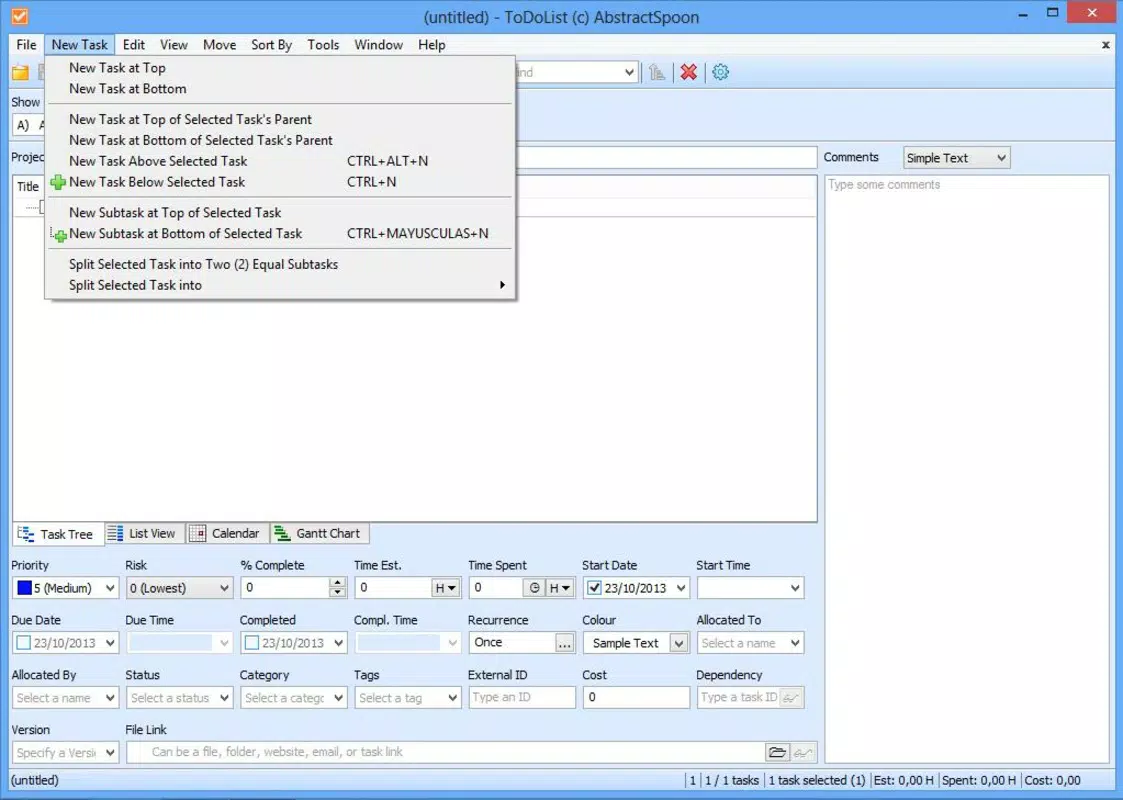
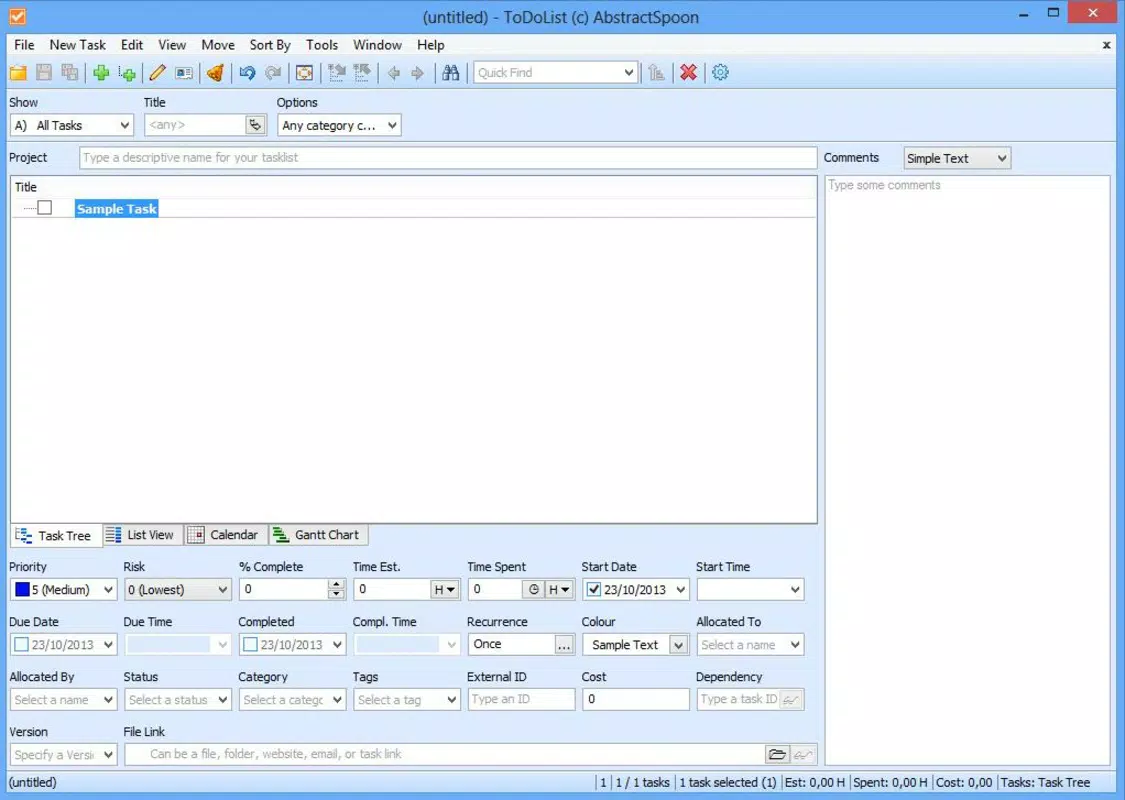
- Task and Subtask Creation: Users can build a detailed hierarchy of tasks and subtasks, enabling comprehensive project breakdowns. This structure supports complex workflows by allowing users to define dependencies and prioritize steps. For example, a freelancer managing a client project can create a main task labeled “Website Development,” with subtasks like “Design Mockups,” “Frontend Coding,” and “Testing.” This ensures clarity and prevents oversight.
- Progress Tracking: Each task can be assigned a completion percentage, which updates dynamically as work progresses. This visual metric helps users stay on track and identify bottlenecks. For instance, if a task is 60% complete, the user can assess remaining effort and adjust timelines accordingly. This feature is particularly effective for long-term projects requiring sustained effort.
- Manager Assignment: Tasks can be assigned to specific managers, which enhances accountability in team settings. This functionality ensures that responsibilities are clearly defined. In a group project, assigning a manager to each subtask allows for centralized oversight and smoother coordination.
- Notes and Comments: Users can attach contextual information to tasks, such as deadlines, links, or reminders. This feature fosters better communication, especially when multiple stakeholders are involved. A team leader can add a comment like “Client requested revisions by Friday” to a design task, ensuring all members are aligned.
- Development Charts: The app generates visual charts that illustrate task progress over time. These charts help users analyze productivity trends and make informed decisions about future planning. For example, a user can compare weekly completion rates to identify patterns in workflow efficiency.
Interface, UX & Performance
The user interface of ToDoList Portable is designed with simplicity and functionality in mind. The layout emphasizes clarity, with tasks and subtasks displayed in a structured, scrollable list. Navigation is intuitive, allowing users to expand or collapse task hierarchies with a single tap. Visual cues such as color-coded progress bars and icons for notes and managers enhance usability without overwhelming the user.
Although the developer did not list formal performance metrics, the app appears optimized for smooth operation across a range of device categories. The interface responds promptly to user inputs, with minimal lag during task creation, editing, or progress updates. Stability is maintained during extended use, with no reported crashes or freezes in the provided information. The app maintains consistent performance even when managing multiple tasks with subtasks and attached notes.
Responsiveness is evident in how the app handles real-time updates—when a progress percentage is adjusted, the visual indicator changes immediately. This instant feedback improves the user experience and reinforces engagement. The app’s design adheres to standard mobile interaction patterns, making it accessible to users familiar with other productivity tools. Overall, the UX is focused on reducing friction and enabling efficient task management.
Platform Compatibility & Technical Requirements
ToDoList Portable is available on Android and iOS platforms, offering cross-device accessibility for users across different ecosystems. The app is compatible with devices running the latest versions of both operating systems, ensuring support for modern hardware and software capabilities. The file size is 18.7 MB, making it lightweight and suitable for devices with limited storage.
The developer did not specify minimum OS requirements or exact version compatibility details. However, the app’s lightweight footprint and focus on core functionality suggest it is optimized for a wide range of devices, including mid-tier smartphones and tablets. Users are advised to ensure their device meets standard system requirements for app installation. Compatibility information was not fully disclosed, so users should verify their device’s specifications before downloading.
Pros and Cons
- Streamlined task and subtask hierarchy for detailed project planning
- Visual progress tracking with percentage completion indicators
- Manager assignment for enhanced accountability in team environments
- Integrated notes and comments for improved communication
- Development charts for analyzing productivity trends over time
- Lightweight file size (18.7 MB) for efficient storage usage
- Specific technical requirements were not listed
- Compatibility details for older OS versions were not disclosed
- Advanced customization options were not mentioned
- Cloud sync or backup functionality was not specified
- Offline access capabilities were not confirmed
FAQ
Is ToDoList Portable available for both Android and iOS?
Yes, the app is available on both Android and iOS platforms, allowing users to access their tasks across different devices.
Can I use ToDoList Portable without an internet connection?
While the app may support offline use, the developer did not confirm this functionality. Users should verify offline capabilities based on their device settings.
Does ToDoList Portable offer cloud synchronization?
The developer did not provide information about cloud sync or data backup features. Users should consider local storage as the primary method for saving data.
How frequently is ToDoList Portable updated?
Specific update frequency was not disclosed. Users are encouraged to check the app store for the latest version and improvements.
Is ToDoList Portable secure for storing personal or team data?
The app’s security features were not detailed. Users should ensure their device has appropriate security settings enabled when using the app.
Final Thoughts
ToDoList Portable stands out as a focused and efficient tool for managing tasks and projects with clarity and structure. Its ability to organize work through hierarchical task creation, real-time progress tracking, and collaborative features makes it a valuable asset for individuals and teams alike. The inclusion of manager assignments and notes fosters accountability and communication, while development charts offer insights for continuous improvement.
Though some technical details remain unspecified, the app’s lightweight design, intuitive interface, and practical features deliver strong value for users seeking a reliable productivity companion. Whether managing personal goals or leading a team project, ToDoList Portable provides the tools needed to stay organized and on track.
Download ToDoList Portable now


